
Click-URL Macros and Accepted Characters
Accepted Characters
All URLs submitted in the platform will only allow the following characters: a-z, 0-9, :,/ ,?, # , [ , ] , @ , ! , $ , & , ‘ , ( , ) , * , + , ; , =, . , – , _ , ~ , % , and spaces and commas.
Click URL Macros
When loading creatives in the LiveIntent platform (See the ‘Creating An Ad’ page for more information), you have the ability to include macros in the Click URL. These macros are validated, meaning that invalid macros cannot be saved at the creative level.
If you try to upload a creative with an incorrect macro, you will see the below prompt:
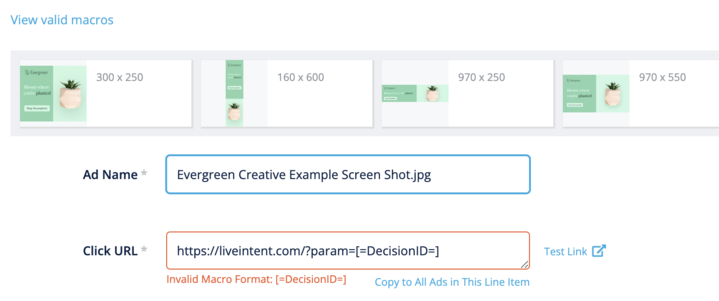
To view the list of valid macros in the platform, click on the blue ‘view valid macros’ text in the upper left corner of the screenshot.
The list of valid macros includes:
| Macro | Value |
| ${CREATIVE_ID} | Unique Creative ID |
| ${PUBLISHER_ID} | Unique Publisher ID |
| ${CAMPAIGN_ID} | Unique Campaign ID |
| ${TEMPLATE_ID} | Unique Template ID |
| ${DEVICE_TYPE} | Device Type from runtime.user_agent |
| ${DECISION_ID} | Unique Decision ID |
Please do not use the privacy macro ${US_PRIVACY} OR ${GDPR} due to the lack of support for this consent string to be passed from a TCF2-compliant CMP in email.